

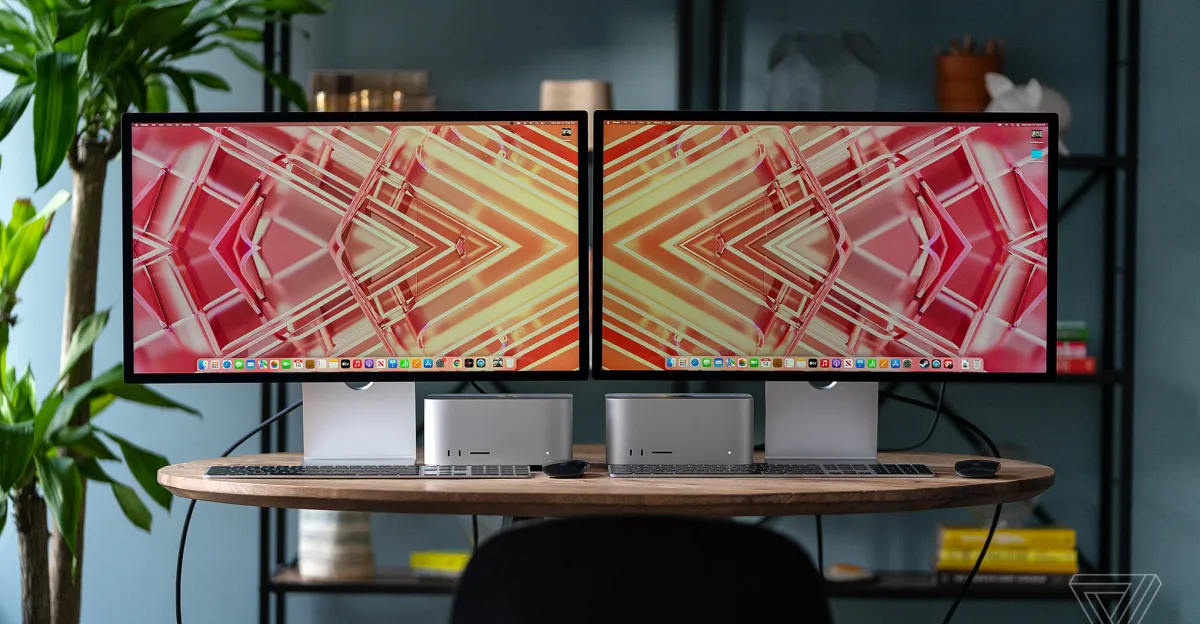

If you have been waiting for the perfect moment to upgrade your creative workstation or home office, that moment has arrived. The Apple Studio Display, a piece of hardware that rarely sees significant discounts, has dropped to one of its lowest prices we have seen in months. For creative professionals, software developers, and enterprise users, this price reduction represents more than just a savings opportunity; it is a strategic entry point into the gold standard of visual fidelity.
- The 5K Advantage: Why Resolution Is Non-Negotiable for Mac Users
- Unpacking the Hardware: What You Get for the Price
- Connectivity: The Hub of the Modern Desk
- The Audio-Visual Experience: Conferencing and Media
- Competitor Analysis: Samsung ViewFinity S9
- Who Should Buy This Deal?
- Maximizing the Investment: Stands and Accessories
- Future-Proofing and Resale Value
- Conclusion: A Window of Opportunity
Current market data indicates that retailers like Amazon and Best Buy have slashed the price of the base model Apple Studio Display to approximately $1,368, down from its rigid MSRP of $1,599. While a $230 discount might seem modest in the world of consumer electronics, seasoned Apple buyers know that price stability is a hallmark of the brand. A drop of this magnitude is a signal to buy, particularly for businesses looking to exhaust their hardware budgets before the fiscal year ends or freelancers seeking a tax-deductible upgrade that will hold its value for years.
In this comprehensive analysis, we will dissect why the Studio Display remains the singular choice for macOS users, how it compares to its closest rivals like the Samsung ViewFinity S9, and why the specific technical specifications of this 5K monitor drive productivity in ways standard 4K panels simply cannot match.
The 5K Advantage: Why Resolution Is Non-Negotiable for Mac Users
To understand the value of the Studio Display, one must first understand the mathematics of macOS scaling. Most monitors on the market are 4K (3840 x 2160). While 4K is excellent for gaming or Windows PCs, it occupies an awkward middle ground for Mac users.
Apple designs its interface around a specific pixel density known as “Retina,” which typically hovers around 218 pixels per inch (PPI). At this density, the operating system can render assets at 2x scale, resulting in incredibly sharp text and UI elements that are perfectly sized. A 27-inch 4K monitor has a pixel density of approximately 163 PPI. To make text readable on a 4K screen, macOS must use fractional scaling. This process renders the screen at a higher virtual resolution and then scales it down, which can introduce subtle blurring, shimmering artifacts, and unnecessary GPU load.
The Studio Display features a native resolution of 5120 x 2880. This is exactly double the horizontal and vertical resolution of the standard 1440p standard. This integer scaling means macOS does not have to perform complex interpolation. Every pixel is crisp, sharp, and exactly where it should be. For software engineers staring at code for ten hours a day, or copywriters reviewing documents, this difference reduces eye strain significantly over time. It is not merely a luxury; it is a health and productivity feature.
Unpacking the Hardware: What You Get for the Price
At the heart of the Studio Display is a 27-inch LCD panel that delivers 600 nits of brightness. While some critics point out the lack of ProMotion (120Hz) or Mini-LED local dimming found in the MacBook Pro liquid retina XDR displays, the Studio Display prioritizes color accuracy and uniformity, which are paramount for print design, photography, and video grading.
P3 Wide Color Gamut
The display supports the P3 wide color gamut, which allows for a billion colors. For creative directors and brand managers, this ensures that the red in a corporate logo looks identical on your screen, your iPhone, and your print materials. The calibration out of the box is legendary. Unlike competitors that often require a colorimeter to fix green or magenta tints, Apple displays are tuned at the factory to meet strict delta-E standards.
The A13 Bionic Chip
What separates this monitor from a “dumb” panel is the inclusion of an A13 Bionic chip. This is the same processor that powered the iPhone 11 series. You might wonder why a monitor needs a smartphone processor. The answer lies in the ecosystem features. The A13 handles image signal processing for the webcam and audio processing for the speakers. It allows for “Hey Siri” functionality to be always on, even if your laptop lid is closed. It also manages the Center Stage feature, which we will discuss in the conferencing section.
Build Quality and Thermal Engineering
The chassis is milled from a single block of aluminum. It acts as a giant heatsink, keeping the panel cool without the need for noisy fans. This silent operation is crucial for audio engineers or anyone recording voiceovers at their desk. The stand, also aluminum, is rigid and wobble-free. This level of industrial design is often imitated but rarely duplicated. When you touch the enclosure, it feels cold and solid, a reassuring sign of premium materials that justify the initial capital expenditure.
Connectivity: The Hub of the Modern Desk
In the era of USB-C, the monitor has become the docking station. The Studio Display includes one upstream Thunderbolt 3 port (compatible with Thunderbolt 4) and three downstream USB-C ports.
96W Power Delivery
The Thunderbolt port delivers 96W of power to the host computer. This is sufficient to fast-charge a 14-inch MacBook Pro and maintain a battery charge on the power-hungry 16-inch MacBook Pro under heavy load. This “one cable solution” simplifies cable management strategies for IT departments and home office minimalists. You plug in one cable, and your laptop instantly connects to power, the display, your external drive, your microphone, and your wired keyboard.
10Gbps USB-C Throughput
The three downstream ports are not slow USB 2.0 hubs often found on cheaper monitors. They support speeds up to 10Gbps (USB 3.2 Gen 2). This allows you to connect high-speed SSDs directly to the back of the monitor without significant throttling. For video editors who work off external T7 or NVMe drives, this convenience improves workflow speed and desk hygiene.
The Audio-Visual Experience: Conferencing and Media
Work from home has transitioned from a temporary necessity to a permanent structure for many enterprises. The Studio Display is built with this reality in mind.
The 12MP Ultra-Wide Camera
The integrated camera uses the A13 chip to enable Center Stage. As you move around your room, the camera digitally pans and zooms to keep you in the frame. While early firmware versions received criticism for image noise, subsequent updates have improved the quality significantly. For Zoom, Teams, and Google Meet calls, it provides a framing that feels dynamic and professional without requiring a camera operator.
Spatial Audio and Mic Array
The audio system consists of a high-fidelity six-speaker system with force-cancelling woofers. This setup produces wide stereo sound and supports Spatial Audio for music and video with Dolby Atmos. For a monitor, the bass response is surprisingly deep, often negating the need for external desktop speakers.
The three-microphone array uses beamforming technology to isolate your voice from background noise. Whether it is the hum of an air conditioner or the typing of a keyboard, the Studio Display filters out distractions so your colleagues hear you clearly. This is a subtle but high-value feature for executives who need to command a room virtually.
Competitor Analysis: Samsung ViewFinity S9
The primary challenger to the Studio Display is the Samsung ViewFinity S9. On paper, the Samsung offers a compelling value proposition. It includes a height-adjustable stand and a matte screen texture in the box—features Apple charges extra for. It also comes with a 4K webcam and Smart TV functionality.
However, the user experience differs. The Samsung ViewFinity S9 uses a plastic back panel and a less rigid stand, leading to a “wobble” that some users find distracting. The interface is based on Tizen OS, which means you have to navigate smart TV menus just to change brightness or input settings. Apple’s integration allows you to control brightness and volume directly from your Mac keyboard without third-party software.
Furthermore, the “matte” finish on the Samsung is standard, which can reduce perceived contrast and sharpness compared to Apple’s glossy glass. Apple offers a nano-texture glass option, but it is an add-on. For purists who want the ink-like blacks and popping colors, the standard glossy Apple glass remains superior. The Studio Display also wins on build quality; it feels like a piece of infrastructure, whereas the S9 feels like consumer electronics.
Who Should Buy This Deal?
The Software Developer
If you are coding in Xcode or VS Code, the 5K resolution allows you to have more lines of code on the screen with perfect clarity. The vertical screen real estate (2880 pixels) is invaluable for debugging and reviewing logs. The discount makes the ROI (Return on Investment) calculation much easier for freelancers.
The Digital Designer
For UI/UX designers using Figma or Sketch, color consistency is the holy grail. Knowing that what you design will look exactly as intended on the millions of iPhones and iPads in the wild is worth the premium. The Studio Display is essentially the reference monitor for the Apple ecosystem.
The Corporate Executive
For the C-suite, time is the most expensive asset. The reliability of the “plug and play” nature of the Studio Display ensures no time is wasted troubleshooting connections or audio drivers. The aesthetic also aligns with the professional image of a modern executive office.
Maximizing the Investment: Stands and Accessories
When purchasing the Studio Display during this sale, you will face a choice regarding the stand.
Tilt-Adjustable Stand: This is the default. It offers 30 degrees of tilt. For most users with a standard height desk (29-30 inches), this is sufficient.
Tilt- and Height-Adjustable Stand: This upgrade costs roughly $400 more. It uses a counterbalancing arm similar to the Pro Stand on the Pro Display XDR. It feels weightless to move. If you share a desk with someone of a different height, or if you alternate between sitting and standing, this is an ergonomic necessity.
VESA Mount Adapter: For the ultimate setup, buy the VESA mount version. This allows you to attach the display to a high-end arm like the Herman Miller Ollin or Ergotron LX. This frees up desk space and allows for rotation into portrait mode, which is a game-changer for coding or reading long legal contracts. Note that you must choose your mount style at the point of purchase; they are not interchangeable later.
Future-Proofing and Resale Value
One aspect of Apple hardware that often goes unmentioned is residual value. High-end PC monitors from brands like Dell or LG tend to depreciate rapidly. Apple displays, however, hold their value exceptionally well. The Thunderbolt Display, released in 2011, still sells for a respectable amount on the used market.
Buying the Studio Display at a discount today essentially guarantees a lower cost of ownership over five years. If you decide to sell it in 2030, you will likely recoup a significant percentage of your initial outlay. This makes the “net cost” of the monitor surprisingly competitive with cheaper, disposable alternatives.
Conclusion: A Window of Opportunity
The current price drop on the Apple Studio Display is a rare event in the hardware calendar. It signals a moment where the premium for entering the 5K ecosystem is significantly reduced. For the professional who relies on their Mac to generate income, the monitor is the most used tool in the arsenal. You look at it more than you look at your family, your car, or your home.
Compromising on the display you stare at for 2,000 hours a year is a false economy. The eye strain, the friction of scaling artifacts, and the lack of integrated features cost more in lost productivity than the price difference between a budget 4K monitor and this 5K powerhouse.
With the current deal at Best Buy and Amazon bringing the price down to the $1,300 range, the barrier to entry has been lowered. Whether you are equipping a design studio, upgrading a home office, or simply demanding the best visual experience macOS can offer, now is the time to execute the purchase. Inventory at these prices is often limited, and once the allocation is sold, prices will likely return to the standard MSRP. Secure your visual future today.