


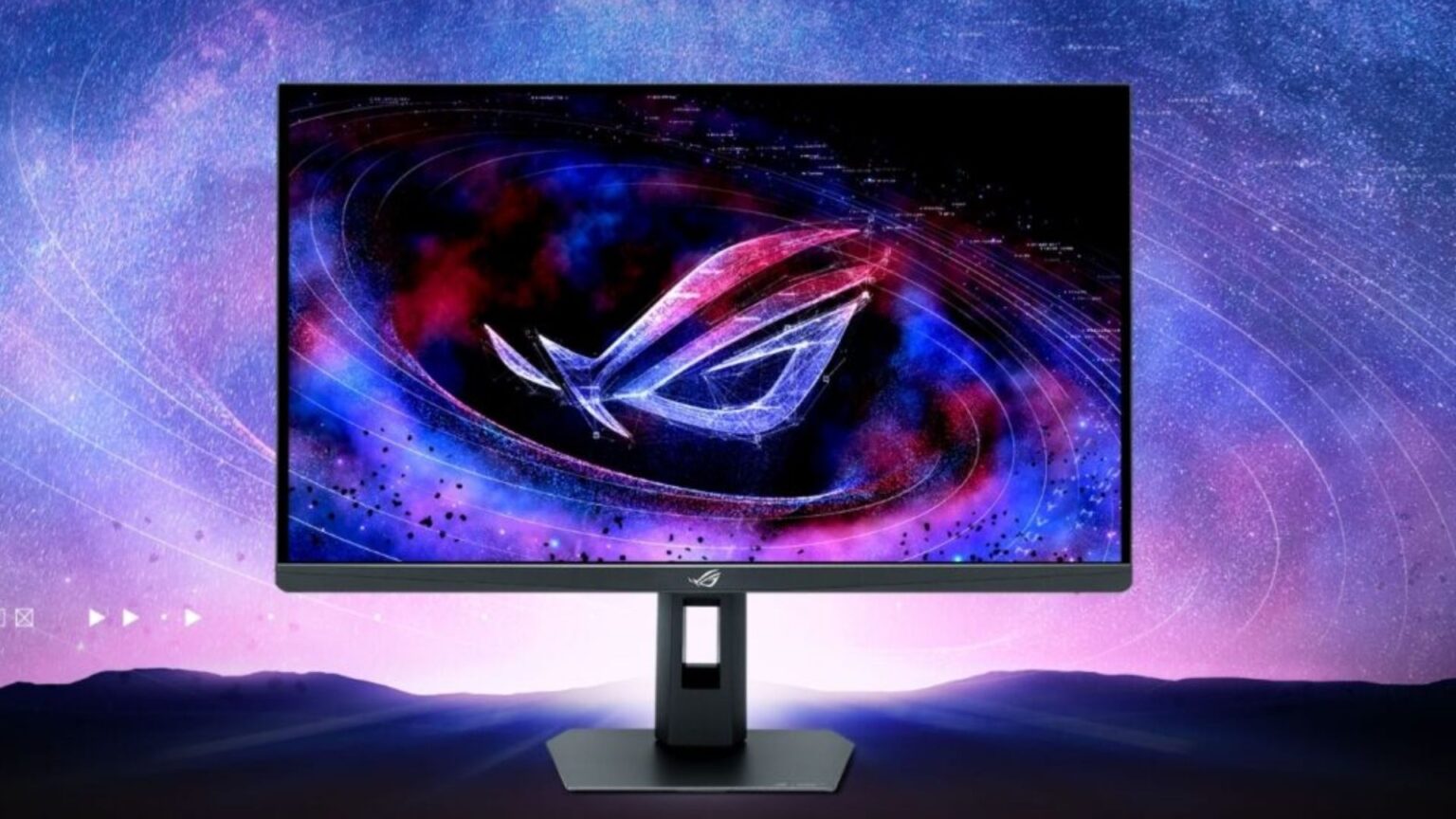

We have entered a strange new era of PC hardware where the display technology has finally, and violently, outpaced the graphics cards powering them. If you thought your top-tier rig was future-proof, Asus has a hard truth for you. Their latest release, the ROG Strix XG27JCG, is a peripheral so advanced that it technically breaks compatibility with the most powerful consumer GPU currently on the market, the Nvidia GeForce RTX 4090.
- The Spec Sheet That Broke the Internet
- The Bandwidth Crisis: DisplayPort 1.4 vs. DisplayPort 2.1
- Dual-Mode Technology: The Esports Game Changer
- Visual Fidelity and the “Retina” Advantage
- The Elephant in the Room: The RTX 50-Series (Blackwell)
- Panel Technology: Fast IPS vs. OLED
- Who is the Asus XG27JCG For?
- The Connectivity Ecosystem
- Final Verdict: A Glimpse of 2026
- Technical Analysis: The Bandwidth Math
This is not just another monitor launch. This is a line in the sand for the next generation of computing. We are looking at a 27-inch panel that offers a native 5K resolution at a blistering 180Hz refresh rate, with a Jekyll-and-Hyde ability to transform into a 330Hz 1440p esports speedster. But the headline isn’t just the specs; it is the fine print. Asus has officially listed the Nvidia RTX 50-series as the required hardware to unlock this beast’s full potential, leaving current-gen adopters in a bandwidth bottleneck.
Let us dive deep into the technical specifications, the bandwidth crisis known as DisplayPort 2.1, and why this monitor effectively serves as the first true harbinger of the Blackwell GPU generation.
The Spec Sheet That Broke the Internet
To understand the controversy, we must first appreciate the engineering marvel that is the XG27JCG. For years, the “holy grail” of monitor density has been the 5K mark (5120 x 2880) at 27 inches. This configuration delivers roughly 218 Pixels Per Inch (PPI), a density that Apple successfully marketed as “Retina” because, at normal viewing distances, the human eye cannot distinguish individual pixels.
Until now, high-refresh-rate 5K panels were practically non-existent in the gaming space. You could choose high resolution (60Hz productivity displays) or high refresh rates (1440p or 4K gaming displays). Asus has merged these worlds.
Key Specifications of the ROG Strix XG27JCG:
- Panel Type: Fast IPS
- Native Resolution: 5K (5120 x 2880)
- Max Refresh Rate: 180Hz (Overclocked)
- Pixel Density: 218 PPI
- Dual-Mode Support: Switches to QHD (2560 x 1440) at 330Hz
- Response Time: 0.3ms (GtG)
- Color Coverage: 97% DCI-P3 / 130% sRGB
- Connectivity: USB-C (15W PD), DisplayPort 1.4 (DSC), HDMI 2.1
On paper, this is the ultimate “do anything” display. It offers the crisp text clarity required for 8-hour workdays in Premiere Pro or Excel, and the motion clarity needed for Grand Master rank in Overwatch 2. However, the bottleneck lies in how you move that many pixels that fast.
The Bandwidth Crisis: DisplayPort 1.4 vs. DisplayPort 2.1
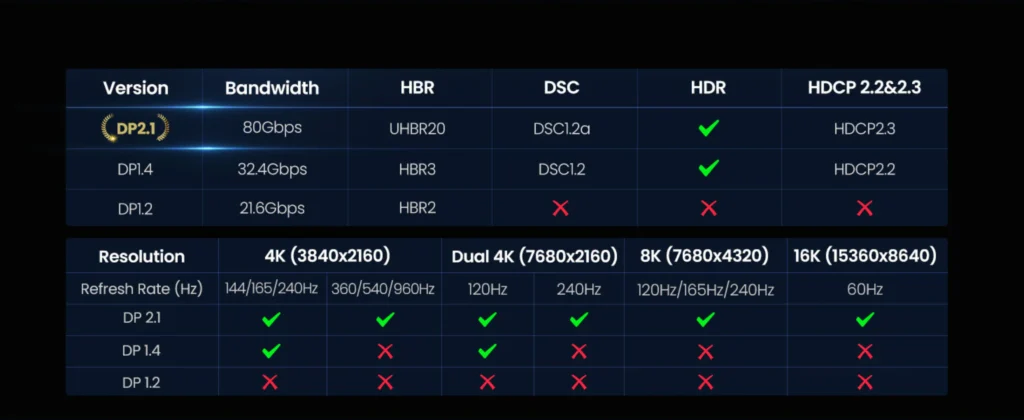
The reason this monitor has sparked such intense debate in the enthusiast community is its official system requirements. To run 5K at 180Hz without severe compromises, you need massive bandwidth.
Let us do the math. A standard 4K signal at 144Hz requires roughly 32 Gbps of data bandwidth. A 5K signal contains nearly 78% more pixels than 4K. pushing that resolution to 180Hz requires data rates that completely saturate older connection standards.
The Nvidia RTX 40-series, including the flagship RTX 4090, utilizes DisplayPort 1.4a. This standard is capped at a maximum total bandwidth of 32.4 Gbps (25.92 Gbps effective). Even with Display Stream Compression (DSC), which mathematically compresses the image to fit through the pipe, 5K at 180Hz is a bridge too far for DP 1.4 to handle flawlessly without chroma subsampling (reducing color data) or other visual artifacts.
This is where DisplayPort 2.1 enters the conversation. DP 2.1 massive increases bandwidth capacity, with tiers going up to 80 Gbps (UHBR20). This is the pipe size required to drive the XG27JCG at its native limits.
Currently, the only consumer GPUs that support DisplayPort 2.1 are AMD’s Radeon RX 7000 series (like the RX 7900 XTX and surprisingly the RX 7600). Nvidia omitted this port on the 40-series, a decision that was criticized at launch and has now come back to haunt high-end users. Asus explicitly mentions that for full 5K 180Hz support, users should utilize an “Nvidia RTX 50-series” card or compatible AMD GPU. This is one of the first times a hardware manufacturer has effectively soft-announced the necessity of an unreleased GPU generation to sell a current product.
Dual-Mode Technology: The Esports Game Changer
While the 5K mode grabs headlines, the “Dual-Mode” feature is arguably more significant for the competitive gamer. We are seeing a trend in 2025 where monitors are no longer fixed to a single native operational mode.
The XG27JCG allows users to hotkey switch into a “Frame Rate Boost” mode. This creates a logical handshake with the GPU to treat the monitor as a native 1440p (QHD) display running at 330Hz.
Why is this different from just changing resolution in Windows?
When you lower resolution on a standard fixed-pixel monitor, the internal scaler has to interpolate pixels, often resulting in a blurry, soft image. With Dual-Mode technology, the monitor changes its scan rate behavior. Because 5K (5120 x 2880) is exactly double the linear resolution of 1440p (2560 x 1440), the XG27JCG can perform integer scaling. It effectively groups four physical pixels to act as one logical pixel.
This results in a 1440p image that looks native, with perfect 1:1 pixel mapping, while freeing up enough bandwidth and processing overhead to nearly double the refresh rate to 330Hz. For a user who plays Cyberpunk 2077 on Tuesday (visuals first) and Valorant on Wednesday (speed first), this eliminates the need for a dual-monitor setup. You get the best of both worlds without the desk clutter.
Visual Fidelity and the “Retina” Advantage
For years, Windows users have looked at Apple’s 5K Studio Displays with envy. The sharpness provided by 218 PPI changes the computing experience. Text looks like it is printed on a glossy magazine page. UI elements are crisp. In gaming, this density provides a form of natural anti-aliasing. The pixels are so small that jagged edges (aliasing) are naturally smoothed out by your eye, reducing the need for performance-heavy anti-aliasing techniques like MSAA.
The XG27JCG brings this level of fidelity to the PC gaming space. However, it also introduces a challenge: GPU horsepower.
Rendering native 5K is significantly harder than 4K. It is 14.7 million pixels per frame. At 180 frames per second, the GPU is asked to calculate over 2.6 billion pixels every second. Even an RTX 4090 will struggle to hit these framerates in modern AAA titles without the help of AI upscaling technologies like DLSS or FSR.
This is where the monitor’s “AI Visual” suite comes into play. Asus has integrated AI-driven dynamic crosshairs and shadow boosting technologies directly into the monitor’s firmware. While these won’t increase your FPS, they help mitigate the competitive disadvantage of running at such high resolutions by improving visibility in dark scenes.
The Elephant in the Room: The RTX 50-Series (Blackwell)
The existence of this monitor serves as a massive confirmation of what we can expect from Nvidia’s next generation of cards, codenamed Blackwell (likely the RTX 5090 and 5080).
If Asus is building displays that saturate DisplayPort 2.1 bandwidth, we can infer that the RTX 50-series will not just feature DP 2.1, but will likely feature the full bandwidth UHBR13.5 or UHBR20 implementation. This monitor is essentially “Blackwell Ready.”
For early adopters buying the XG27JCG today with an RTX 40-series card, the experience will likely involve compromise. You may be forced to run the monitor at 5K 120Hz, or rely on heavy DSC compression which can occasionally cause alt-tab black screens or handshake issues. It is a product released slightly ahead of the ecosystem required to support it fully.
Panel Technology: Fast IPS vs. OLED
In an era dominated by OLED hype, why did Asus choose IPS for this flagship? The answer lies in burn-in anxiety and static content.
OLED panels are superior for contrast and HDR gaming due to their per-pixel dimming. However, 5K monitors are predominantly used for productivity—coding, video editing, and reading. These tasks involve static UI elements (taskbars, windows) that are the enemy of OLED longevity.
By using a “Fast IPS” panel, Asus is targeting the “pro-sumer.” The person who leaves their monitor on for 12 hours a day working on spreadsheets or code, and then games for 3 hours at night. IPS offers peace of mind for burn-in, and while the contrast ratio (typically 1000:1 to 2000:1) cannot compete with OLED’s infinite contrast, the text clarity of an IPS RGB subpixel layout is generally superior to the WOLED or QD-OLED subpixel structures found in current gaming panels.
Who is the Asus XG27JCG For?
This is a niche product, but a highly lucrative one. It targets three specific demographics:
- The Hybrid Creative/Gamer: You use a Mac Studio for work (which benefits from 5K) but have a high-end PC for gaming. This monitor bridges that gap better than any other.
- The Simulation Enthusiast: Flight Simulator and Racing Sim fans crave resolution to see distant details (like braking markers or runway lights). 5K provides that clarity, and the 180Hz refresh rate provides the smoothness.
- The Future-Proofer: This is the gamer who plans to buy the RTX 5090 on day one. They are buying this monitor not for what their PC can do today, but for what it will do tomorrow.
The Connectivity Ecosystem
We must also address the I/O. The inclusion of USB-C with Power Delivery (PD) is welcome, but 15W is arguably low for a monitor of this caliber. It is enough to keep a phone charged or slow-charge an iPad, but it will not sustain a modern laptop under load. This suggests Asus assumes this monitor will be connected to a desktop PC, not a docked laptop, which is a fair assumption given the gaming focus.
The inclusion of HDMI 2.1 allows for console compatibility, but neither the PS5 nor the Xbox Series X can output 5K. They will likely default to a downscaled 4K signal or the 1440p 120Hz mode. This monitor is strictly a PC Master Race luxury item.
Final Verdict: A Glimpse of 2026
The Asus ROG Strix XG27JCG is a frustratingly brilliant piece of hardware. It is frustrating because it highlights the shortcomings of current “top-tier” GPUs. It is brilliant because it pushes the industry forward.
It forces the hand of GPU manufacturers to standardize DisplayPort 2.1. It proves that we do not have to choose between “Retina” resolution and “Esports” refresh rates. We can have both.
If you are currently building a high-end setup, this monitor should be on your radar, but with a caveat: You are buying a Ferrari engine, but you might only have premium unleaded fuel until the next generation of graphics cards arrives. If you can accept that temporary bottleneck, the XG27JCG offers a visual experience that is virtually unrivaled in the LCD market.
For the competitive gamer who also creates content, the Dual-Mode feature is the killer app. The ability to have a workspace that rivals an Apple Studio Display by day, and a 330Hz tournament-grade panel by night, justifies the likely premium price tag. Just remember to start saving for that RTX 5090 upgrade; you are going to need it.
Technical Analysis: The Bandwidth Math
For the technically inclined, here is why DP 1.4 fails.
- 5K Resolution: 5120 x 2880
- Color Depth: 10-bit (required for HDR)
- Refresh Rate: 180Hz
- Data Rate Required (Uncompressed): Approx. 80+ Gbps.
DisplayPort 1.4a has a max payload of 25.92 Gbps. Even with DSC (which typically offers a 3:1 compression ratio), we are pushing the absolute theoretical limits of the cable and the controller. This often results in “link training” failures where the monitor might black screen or drop to a lower refresh rate.
DisplayPort 2.1 with UHBR13.5 (54 Gbps) or UHBR20 (80 Gbps) handles this traffic with ease. This is why the compatibility list is so specific. It is not marketing fluff; it is physics.
As we move toward the release of this monitor, keep an eye on the “Certified” cable market. You will need VESA-certified DP80 cables to ensure signal integrity at these speeds. The era of using the cheap cable included in the box is over.
Sources:
- Asus ROG Official Product Pages
- Tom’s Hardware Monitor Reviews
- VESA DisplayPort 2.1 Standard Whitepapers