


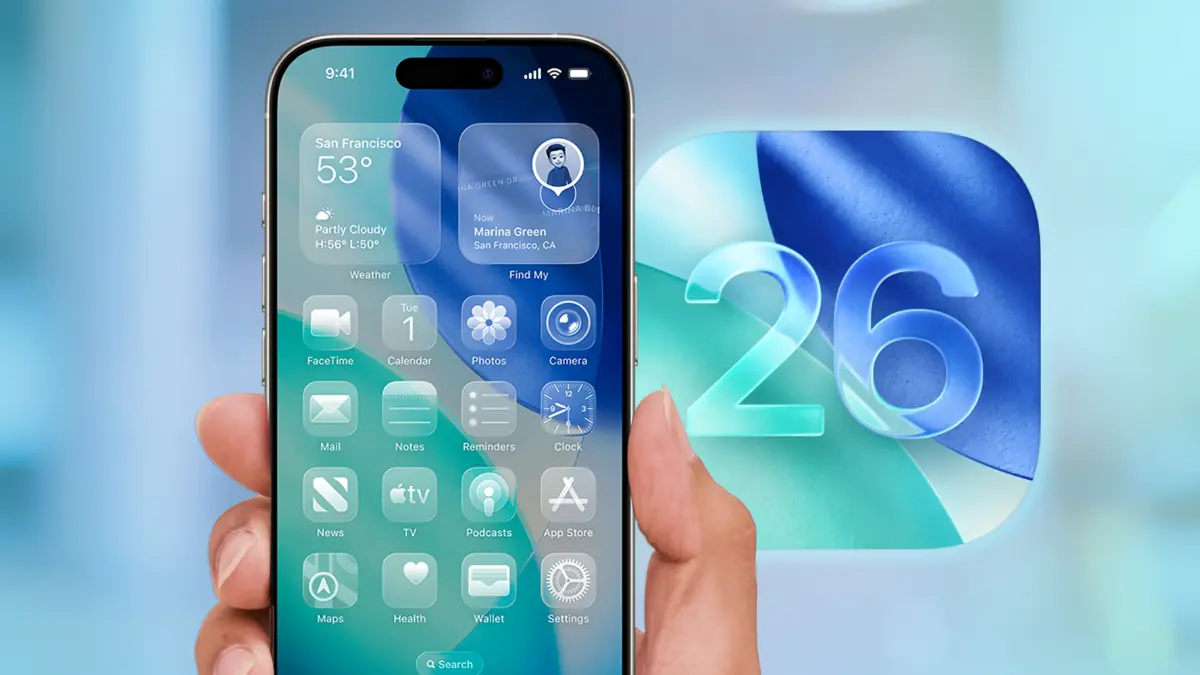

A massive security red flag has just been raised for the entire Apple ecosystem. If you are holding an iPhone right now, you need to stop what you are doing and pay attention. The tech giant has just released iOS 26.2, a pivotal update that does far more than just tweak your lock screen. This release comes with a dire warning regarding multiple “actively exploited” security vulnerabilities that could leave your personal financial data, corporate credentials, and digital identity completely exposed to sophisticated cyberattacks.
- The Critical Security Threat: Why You Must Update Immediately
- New Feature Spotlight: Liquid Glass and Interface Overhaul
- Enterprise Security and Mobile Device Management (MDM)
- The “Update Now” Warning: A Timeline of Events
- Detailed Breakdown of Vulnerabilities Patched
- How to Install iOS 26.2 Safely
- Enhanced Safety Alerts: A Lifesaver
- The Impact on Battery Life and Performance
- Troubleshooting Common Update Issues
- The Future: What to Expect in iOS 26.3
- Financial Security in the Mobile Age
- Conclusion: Do Not Delay
- Why This Update Matters for High Net Worth Individuals
- The Role of VPNs in Post Update Security
- Managing Storage with High Resolution Media
- Final Thoughts on Digital Hygiene
In this comprehensive deep dive, we will break down exactly why this update is mandatory, the specific “zero day” threats it neutralizes, and the new high value features like Liquid Glass that are changing the user interface landscape. We will also explore the critical implications for enterprise security and mobile device management, ensuring your business data remains locked down against the rising tide of ransomware and data breaches.
The Critical Security Threat: Why You Must Update Immediately
The primary driver behind this urgent warning is not the flashy new features but the invisible shield it repairs. Apple has confirmed that iOS 26.2 addresses over 20 distinct security vulnerabilities. Two of these are classified as “Zero Day” exploits, meaning hackers were actively using them to breach devices before Apple could issue a fix.
WebKit Vulnerabilities and Remote Code Execution
The most severe threats lie within WebKit, the engine that powers Safari and all web content on iOS. Security researchers identified that processing maliciously crafted web content could lead to arbitrary code execution. In plain English, this means that simply visiting a compromised website could allow an attacker to run malicious software on your iPhone without you ever tapping a button or downloading a file.
This type of vulnerability is a gold mine for cybercriminals looking to deploy spyware or steal banking credentials. For users who rely on their devices for cryptocurrency trading or mobile banking, the risk is astronomical. High value targets such as executives and journalists have reportedly been targeted using similar exploits in the past. By updating to iOS 26.2, you patch this hole and effectively shut the door on these specific attack vectors.
Kernel Privileges and Root Access
Another patched flaw involves the kernel, the core of the operating system. An integer overflow issue allowed malicious apps to gain root privileges. If an attacker gains root access, they effectively own the device. They can bypass sandbox protections, access encrypted messages, and even install persistent malware that survives a reboot. This level of access is often sold for millions on the dark web to state sponsored actors. The patch in iOS 26.2 mitigates this by implementing stricter memory management and validation protocols, a crucial step for anyone concerned with identity theft protection and data privacy.
New Feature Spotlight: Liquid Glass and Interface Overhaul
While security is the broccoli, the new features are the dessert. iOS 26.2 introduces significant refinements to the Liquid Glass design language that debuted with iOS 26. This controversial design shift has polarized users, but the latest update offers the customization options that critics have been demanding.
Customizing the Liquid Glass Experience
The “Liquid Glass” aesthetic adds a translucent, frosted layer to various UI elements, mimicking the look of looking through a pane of textured glass. In iOS 26.2, Apple has added a transparency slider in the Lock Screen customization menu. Users can now adjust the opacity of the time and widgets, allowing for better legibility against complex wallpapers. This is a direct response to accessibility feedback, ensuring that style does not compromise function.
For graphic designers and digital artists, this update serves as a fascinating case study in UI evolution. The ability to blur background elements dynamically requires significant processing power, which is why these features are optimized for the newer A19 Bionic chips found in the iPhone 17 and 18 series.
Enhanced AirDrop Security Verification
AirDrop has also received a massive security overhaul. In previous versions, “cyber flashing” or receiving unwanted files from strangers was a nuisance. iOS 26.2 introduces a verification code system for transfers with unknown contacts.
When someone outside your contacts list attempts to send you a file, a unique four digit code appears on your screen. The sender must verbally confirm or input this code on their device to initiate the transfer. This “handshake” protocol virtually eliminates the possibility of accidental or malicious file acceptances in crowded public spaces like airports or coffee shops. For professionals sharing sensitive documents, this adds a necessary layer of endpoint security to peer to peer transfers.
Enterprise Security and Mobile Device Management (MDM)
For business owners and IT administrators, iOS 26.2 is not optional. The update addresses a specific bug where Privacy and Security settings were incorrectly marked as managed by an enterprise organization. This glitch caused confusion for BYOD (Bring Your Own Device) policies, where personal and corporate data separation is paramount.
Protecting Corporate Data on Personal Devices
With the rise of remote work, the line between personal and professional device usage has blurred. The iOS 26.2 update ensures that Mobile Device Management (MDM) profiles function correctly, preventing data leakage. For companies that rely on cloud security solutions to protect proprietary information, ensuring that every endpoint is patched against the latest kernel vulnerabilities is a compliance necessity.
Failure to update could leave corporate networks vulnerable. If an employee’s personal iPhone is compromised via a WebKit flaw, attackers could potentially pivot to the corporate network if the device is connected to the company VPN. This highlights the importance of rigorous cybersecurity insurance policies that mandate regular software updates for all connected devices.
The “Update Now” Warning: A Timeline of Events
The urgency of this release cannot be overstated. The warning was first flagged by the Indian Computer Emergency Response Team (CERT-In) and echoed by cybersecurity agencies globally.
- September 2025: iOS 26 is released, introducing Liquid Glass.
- November 2025: Reports surface of targeted attacks using WebKit vulnerabilities.
- December 10, 2025: Apple acknowledges the flaws.
- December 12, 2025: iOS 26.2 is released to the public.
- December 14, 2025 (Today): Security experts issue a “Do Not Wait” advisory.
The window of exposure is closing. Hackers often reverse engineer security patches immediately after they are released to create exploits for unpatched devices. This phenomenon, known as “n-day” exploitation, means your device is more vulnerable now than it was last week if you do not update.
Detailed Breakdown of Vulnerabilities Patched
To understand the gravity of the situation, let us look at the technical specifics of the patches included in this release.
- CVE-2025-46285 (libarchive): A memory corruption issue in the file compression handling could allow an app to bypass sandbox restrictions. This is critical for preventing ransomware from encrypting your local files.
- App Store Sandbox Escape: A flaw allowed malicious applications to access sensitive payment tokens used for in-app purchases. This fix is vital for protecting credit card information stored in Apple Wallet.
- FaceTime State Management: A bug allowed passwords to be unintentionally removed or exposed during remote control sessions. This has significant implications for remote IT support services that rely on screen sharing tools.
- Safari Crash Loop: Processing maliciously crafted web content could lead to an unexpected Safari crash, which, while less severe than code execution, acts as a Denial of Service (DoS) for the user.
How to Install iOS 26.2 Safely
Updating your iPhone is usually a seamless process, but given the stakes, it is worth following best practices to ensure data recovery is possible if something goes wrong.
Step 1: Backup Your Data
Before initiating any major update, you must secure your data.
- iCloud Backup: Go to Settings > [Your Name] > iCloud > iCloud Backup and tap “Back Up Now.” Ensure you have enough cloud storage available.
- Local Backup: Connect your iPhone to your Mac or PC. Use Finder or iTunes to create a full, encrypted local backup. This is the gold standard for disaster recovery.
Step 2: Clear Storage Space
iOS 26.2 is a substantial file. You may need to free up 3 to 5 GB of space. Offload unused apps or transfer large video files to an external SSD or cloud drive.
Step 3: Update Over the Air
- Open the Settings app.
- Navigate to General.
- Tap Software Update.
- You should see “iOS 26.2” listed. Tap Download and Install.
Note: If you see a message about “Automatic Updates,” verify that it is toggled ON for both download and installation. However, do not rely on the overnight schedule. Force the update manually right now.
Enhanced Safety Alerts: A Lifesaver
Another feature flying under the radar is the expansion of Enhanced Safety Alerts. In iOS 26.2, Apple has integrated more granular data sources for natural disaster warnings. Users in supported regions will now receive rich notifications for floods, earthquakes, and wildfires that include map visualizations directly on the Lock Screen.
This feature relies on real time location data and integration with government alert systems. For families living in disaster prone areas, this functionality transforms the iPhone into an essential survival tool. It also opens up new avenues for insurtech companies to integrate real time risk assessment data into their apps.
The Impact on Battery Life and Performance
A common fear preventing users from updating is the dread of battery drain. Early reports for iOS 26.2 are promising. The update includes specific optimizations for background processes related to the new Liquid Glass UI.
In the initial 24 to 48 hours after updating, you may experience slightly higher battery consumption. This is normal behavior as the iPhone re-indexes your files and photos for Spotlight search and local machine learning models. Do not panic. Allow the device to complete these background tasks while connected to power. If drain persists after three days, you may need to check your battery health settings or consult a technical support professional.
Troubleshooting Common Update Issues
Despite Apple’s quality assurance, some users may encounter hurdles.
“Unable to Verify Update” Error
This typically occurs due to network congestion or a corrupted download.
- Fix: Delete the update file from Settings > General > iPhone Storage. Restart your phone and try the download again using a different Wi-Fi network.
Device Stuck on Apple Logo
This is the nightmare scenario, often referred to as a “boot loop.”
- Fix: You will need to enter Recovery Mode. Connect the iPhone to a computer, press Volume Up, Volume Down, then hold the Side Button until the recovery screen appears. You can then choose to “Update” (which attempts to keep data) or “Restore” (which wipes the device). This highlights the critical importance of having a recent backup to avoid data loss.
The Future: What to Expect in iOS 26.3
Rumors are already circulating about the next iteration, likely due in early 2026. Leaks suggest we might see further integration of AI driven predictive text and deeper health monitoring capabilities that could link with telemedicine platforms.
However, we must stay grounded in the present. The features of tomorrow do not matter if your device is compromised today. The security landscape is evolving at a terrifying pace. Cyber threats are becoming automated, cheap to deploy, and ruthless. Your operating system is your first and most important line of defense.
Financial Security in the Mobile Age
Your iPhone is no longer just a phone. It is your bank branch, your credit card, and your vault. The vulnerabilities patched in iOS 26.2 jeopardize the safety of mobile banking apps, crypto wallets, and stock trading platforms.
If a hacker gains access via a WebKit exploit, they could potentially overlay fake login screens on top of legitimate banking apps, a technique known as “screen overlay attacks.” By updating, you ensure that the system level protections against these UI hijacks are robust and up to date. For anyone managing significant assets via mobile, neglecting this update is a massive financial risk.
Conclusion: Do Not Delay
The “Update Now” warning issued to all iPhone users is not clickbait. It is a genuine advisory born from the reality of modern cyber warfare. The combination of active exploits, high severity vulnerabilities, and the massive user base of the iPhone makes iOS 26.2 one of the most important updates of the year.
You gain access to the refined Liquid Glass interface, you get the peace of mind of AirDrop verification, and most importantly, you close the door on hackers who are actively hunting for unpatched devices.
Take five minutes today to secure your digital life. Connect to Wi-Fi, plug in your charger, and hit that update button. Your data, your privacy, and your peace of mind are worth it.
Action Plan for You: Check your iPhone Settings immediately to confirm your current version. If it does not say iOS 26.2, initiate the update process now. If you manage devices for a family or a business, send a notification to your group urging them to follow suit. Security is a team sport.
Source Links:
- Apple Support: About the security content of iOS 26.2
- MacRumors: iOS 26.2 Released with Security Fixes
- CNET: Liquid Glass and Safety Alerts in iOS 26.2
- CERT-In Advisory on Apple Vulnerabilities
Why This Update Matters for High Net Worth Individuals
For individuals with significant public profiles or high net worth, the stakes of digital security are elevated. “Whaling” attacks phishing campaigns targeting senior executives are increasingly leveraging mobile OS vulnerabilities. The iOS 26.2 update includes specific hardenings that make it more difficult for spyware tools (similar to Pegasus) to establish persistence on a device.
Investing in premium cybersecurity services is wise, but the foundation of any defense strategy is basic patch management. By ensuring your device is on iOS 26.2, you are raising the cost of attack for any potential adversary. They can no longer use cheap, known exploits; they must burn expensive zero day capabilities to target you, which significantly reduces the likelihood of a casual attack.
The Role of VPNs in Post Update Security
While updating iOS is critical, it is not a silver bullet. You should continue to layer your defenses. Using a reputable Virtual Private Network (VPN) remains essential, especially when connecting to public Wi-Fi. The update patches the device, but a VPN encrypts the transit of your data.
Look for VPN providers that offer “Double Hop” features and strict no logs policies. These tools, combined with the structural security of iOS 26.2, create a formidable barrier against data interception and surveillance.
Managing Storage with High Resolution Media
One hidden aspect of the new iOS 26 features is the increasing demand for storage. The new “Spatial Video” capabilities and high fidelity “Liquid Glass” assets take up space. Users should consider upgrading their cloud storage plans (like iCloud+ or enterprise cloud solutions) to ensure they do not run into the “Storage Full” error during critical updates.
Offloading high resolution photos to a secure cloud backup service not only frees up space for the update but also acts as a ransomware mitigation strategy. If you ever lose access to your device, your memories and documents remain safe in the cloud.
Final Thoughts on Digital Hygiene
This update cycle serves as a reminder to practice good digital hygiene.
- Audit your passwords: Use the built in iOS Password Manager to check for leaked credentials.
- Review App Permissions: Go to Settings > Privacy & Security and review which apps have access to your Photos, Microphone, and Location.
- Enable Two Factor Authentication (2FA): Ensure your Apple ID and all financial accounts are secured with 2FA.
The digital world is perilous, but with tools like iOS 26.2, we have the armor to navigate it safely. Stay updated, stay vigilant, and keep your digital doors locked.